
Books
Every title, with its royalties, ad spend, average CPC, net profit and True ACOS — the page that tells you which books to keep advertising.
One row per title, sorted by net profit. This is where you find the book that sells beautifully and still loses money.
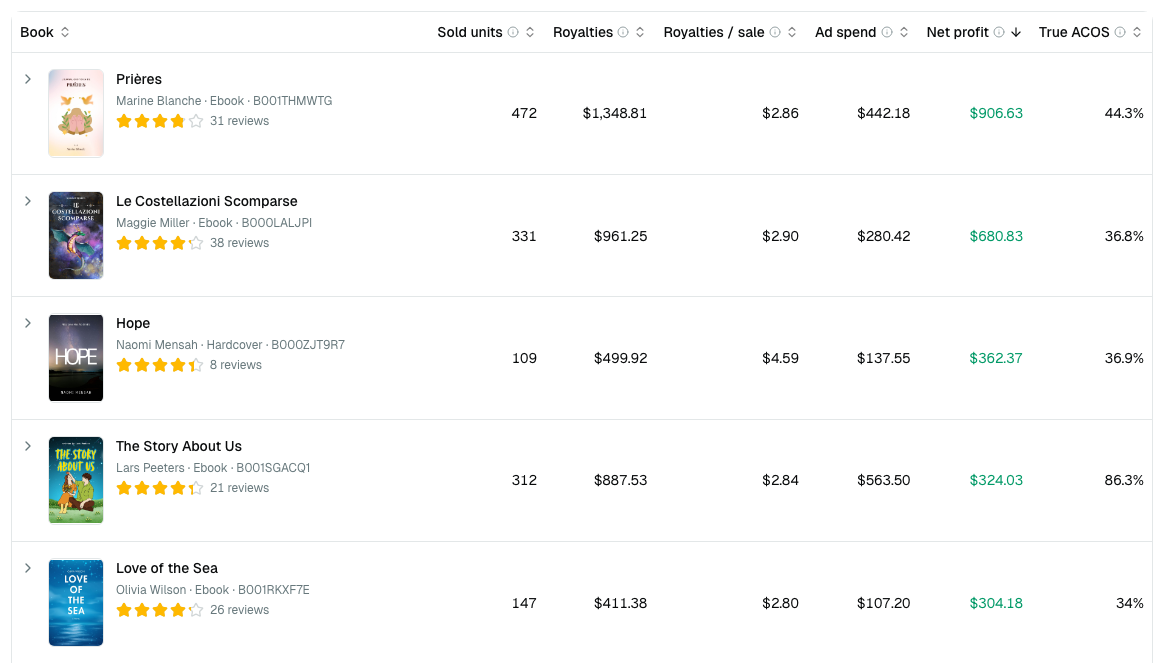
The columns
| Column | Meaning |
|---|---|
| Sold units | Copies sold in the range |
| Royalties | Gross royalties, all channels including Kindle Unlimited |
| Royalties / sale | What one copy really earns you, after Amazon's cut |
| Ad spend | Spend attributed to this title, VAT included |
| Average CPC | What one click on this book's ads cost you, on average |
| Net profit | Royalties kept minus that spend — red when negative |
| True ACOS | Ad spend ÷ ad-generated royalties. Over 100 % is a loss on the ad-driven part |
Click any header to sort. Click a row to expand it for the detail behind the numbers — including each marketplace's own Average CPC.
Reading the table
- Negative net profit — the ads cost more than the book returns. Check whether it is book 1 of a series before pausing anything, in Series.
- True ACOS above 100 % with positive net profit — organic sales are covering the ad losses. Fragile, but not fatal.
- Low royalties per sale — often a paperback where print costs eat the margin.
- High Average CPC next to a low True ACOS — you are paying a lot per click but those clicks convert, so the price is buying something. The reverse — cheap clicks, bad ACOS — usually means the wrong readers are clicking.
Average CPC is a weighted average
It is the book's total ad spend ÷ total clicks, never the average of the marketplaces inside it. Expand a row and you will often see every country above the book's own figure: the cheapest storefront is usually the one taking the most clicks, so it pulls the book's number toward itself. That is correct — it is what you actually paid per click.
Two things to expect:
- It includes the VAT Amazon charges on ads, so it reads slightly higher than the CPC in your Amazon Ads console.
- It is blank (—) when we do not have the clicks for the whole period. Clicks are only imported since 5 August 2026, and dividing all of a period's spend by part of its clicks would print a number several times too high. The page says so when that is why a column is empty.
What is not in a book row
Ad spend Amazon cannot tie to an ASIN — Sponsored Brands, and ads on ASINs outside your KDP catalog — belongs to no single title. It is counted in your global net profit but not in any row here, so the rows can add up to more than your total.
Filters
Author, format, paid or free units, and date range. The author filter is there for pen names. When you show free units only, the list keeps only the titles you gave away during the period.
Covers and reviews
Covers come from your KDP catalog and appear automatically. The review count under each title comes from Amazon — see Reviews.