
Facebook Ads
Connect your Meta ad account so your Facebook and Instagram spend lands in each book's net profit, with your past spend imported and the VAT on your invoices.
Why connect it
Amazon Ads is not the only place authors buy readers. If you also advertise on Facebook or Instagram, that money is missing from your net profit — so TrueRoyalties shows you keeping more than you do. Connecting Meta closes the gap.
The one thing a Facebook ad cannot tell us
An Amazon ad carries an ASIN and a marketplace, so we always know which book it sold and where. A Facebook ad carries neither. It has a name, a budget and a link.
Two questions therefore have no automatic answer:
- Which book is this ad for?
- Which Amazon store should its spend count against? A euro spent sending readers to amazon.de is not the same euro as one sending them to amazon.com.
Everything on the Facebook Ads page exists to answer those two.
Connecting
Go to Platforms → Facebook Ads, or use the Facebook Ads page itself.
Access is read-only. We ask Meta for one permission and nothing else: we can never create, change, pause or delete an ad, and we can never post anything. From your profile we read a single field — your Meta user id — so that if you ever remove the app, Meta can tell us which account to stop reading.
Confirm which ad accounts are yours
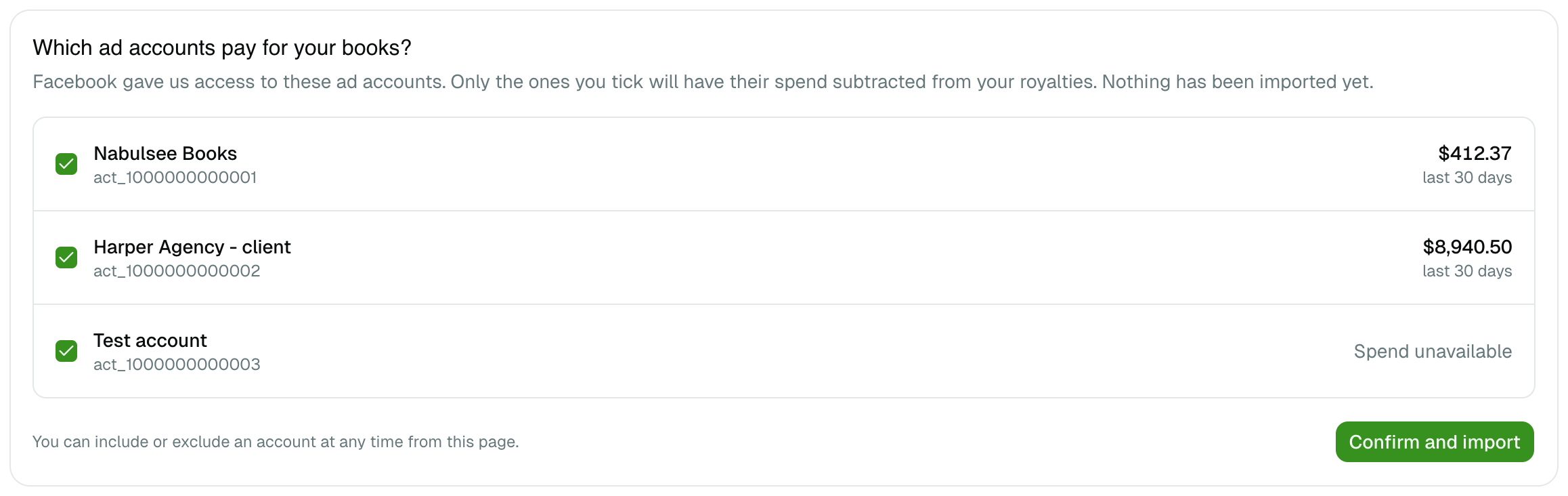
Facebook hands us every ad account you can reach. Nothing is imported until you say which ones pay for your books.
That question is not a formality. If you also run ads for a client, or you sit in an agency's Business Manager, their account appears in the same list — and importing it would subtract their budget from your royalties. Each line shows what that account spent over the last 30 days, which is usually enough to tell them apart at a glance.
You can include or exclude an account later, from the Facebook Ads page.
The history import
Once you confirm, TrueRoyalties imports up to 37 months of history — all Meta keeps. Recent months arrive first, day by day; older months arrive as monthly totals. It runs on its own, and you can keep using the app while it does.
Anything older than 37 months will show royalties with no Facebook cost against them, because that data no longer exists anywhere. The page states the date your Facebook figures start.
Assign a book and a country
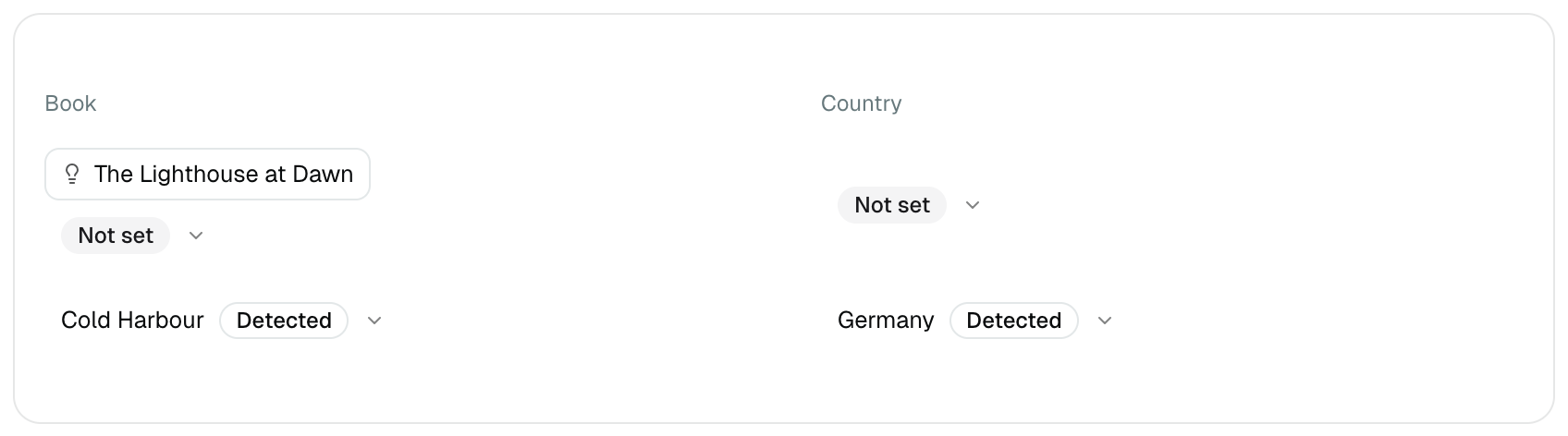
Some ads answer the two questions by themselves:
| The ad links to | What that tells us |
|---|---|
| One of your Smart Links | The book, with certainty — we created that link |
An Amazon product page (/dp/…) | The book and the store |
| Anything else | Nothing. You tell us. |
Where an ad's name contains one of your book titles, we offer that book as a one-click suggestion. We never apply it on our own: a guess that writes itself into a money calculation is not worth the convenience.
The table is sorted by spend, highest first, so the first few rows fix most of the error. Tick several rows to assign them in one go.
Anything you set yourself is never overwritten by a later sync. A value a link revealed carries a Detected badge, so you can always tell the two apart.
What happens to spend you have not assigned
Spend on an ad with no book still counts in your overall net profit — it is real money — but it cannot appear on a per-book line. The page tells you how much is in that state, and you can choose to leave it out instead.
Spend on an ad with no country cannot be counted at all: without a store there is no currency and no market to charge it to. Assign a country and it appears.
VAT on your Meta invoices
If Meta charges you VAT, set the rate in Settings → Taxes. It is a single rate, unlike Amazon's per-store table, because Meta invoices once according to your own country rather than per storefront. Left at 0, spend is counted exactly as invoiced.
Reconnecting
Meta grants access for about 60 days and does not renew it by itself. We email you before it runs out. If it does run out, spend simply stops arriving until you reconnect — your books and countries are kept.
Disconnecting
Disconnect from the Facebook Ads page. The stored access is deleted at once and nothing more is read.
Your ads and every book and country you assigned are kept, because a disconnection is usually followed by a reconnection and that work cannot be recreated by anyone else. Deleting your account removes all of it.
What is imported
- Spend per ad, per day, in the ad account's own currency
- Impressions, clicks, and clicks that left Meta
- Campaign, ad set and ad names, and the link each ad points to
We receive nothing about the people who saw or clicked your ads — no audiences, no demographics, no list of anyone.