
ISBN barcode for your cover
When you need your own barcode on a KDP cover, where it goes, what the five-digit price block means, and how to make one.
The barcode on the back of a printed book is just your ISBN, drawn so a till can read it. You can make one here: ISBN Barcode Generator. It is free and needs no account.
First: you probably do not need one
If you publish a paperback or hardcover through KDP and do nothing, Amazon puts a barcode on your back cover for you, at no cost — and its own barcode is guaranteed to pass its manufacturing checks.
You only need to supply your own if:
- you want the price encoded in it,
- you are printing the same cover somewhere other than KDP, or
- your designer wants the cover finished in one file.
If none of those applies, leave the area blank and let Amazon do it. What you must not do is put artwork or text in that area — Amazon prints over it, and a cover with something underneath is rejected.
Where it goes
Lower right corner of the back cover, in a white box:
| Suggested size | 2 × 1.2 in (50.8 × 30.5 mm) |
| Minimum size | 1.4 × 0.8 in (35.56 × 20.3 mm) |
| Clear of the spine and the trim edge | at least 0.25 in (6.3 mm) |
| Colour | 100% black on a solid white background |
| File | vector if possible, otherwise 300 PPI |
Reserve that space in the first draft of the design rather than clearing it later. The generator measures every barcode against these numbers and tells you whether it fits before you download it.
Making one
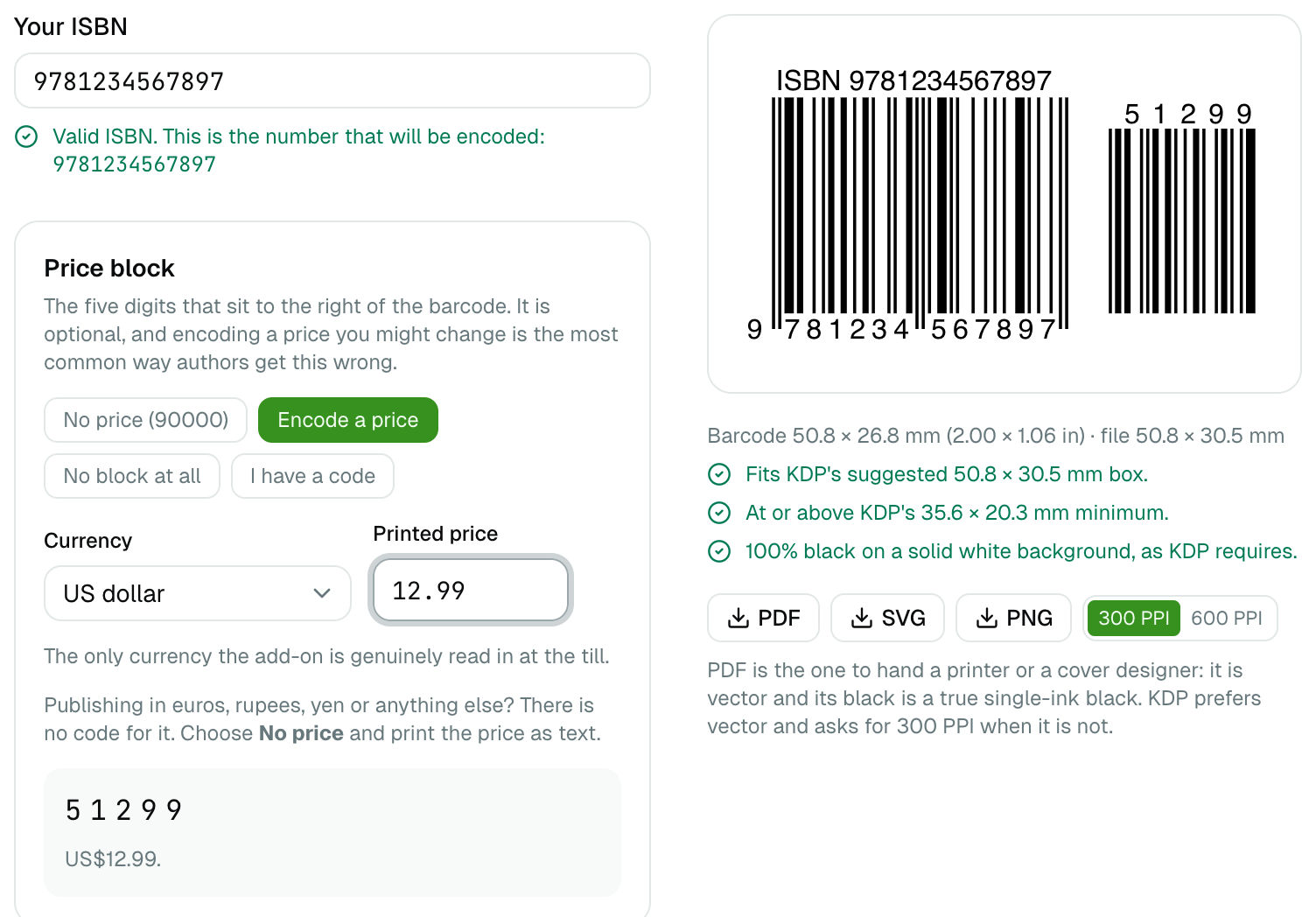
- Type your ISBN. Thirteen digits, or the older ten-digit form, which is converted for you. Hyphens and spaces are fine — type them the way they appear on your ISBN certificate and they are printed the same way.
- Choose a price block, or none. See below.
- Download the PDF and give it to whoever assembles your cover.
If the number is not a valid ISBN the page says so in red and draws nothing. It will not offer to "correct" it for you: a check digit proves that one of the digits is wrong without saying which, so a suggested fix would produce a perfectly valid ISBN belonging to a different book.
The five-digit price block
The small separate barcode to the right of the main one is the price. Its first
digit is the currency, the other four the amount, so 51299 means US$12.99.
It is optional, and leaving it out is usually right. The barcode is printed into the cover, so a price you change later means uploading a new cover — and Amazon discounts at its own discretion whatever your barcode says. KDP's rule is simply that the code must match your list price if you include one, which is a rejection you avoid entirely by not encoding a price. If you are still choosing that price, the royalty calculator shows what each one actually pays you.
When you want the block but not a price, use 90000. It is the code the book industry designates for "no price encoded", and KDP's own example barcode carries it.
| You are pricing in | What to do |
|---|---|
| US dollars | Encode it, up to $250 — KDP's maximum list price |
| Canadian dollars or pounds | Encode it, or use 90000 |
| Euros, rupees, yen, anything else | Use 90000 and print the price as text |
There is no code for the euro. The scheme was designed in the 1980s around a handful of English-speaking markets and never gained one.
Ignore any tool offering Australian or New Zealand dollars. Those codes were withdrawn and reused: since 2004 the same digits mean US dollars over $100, so a block encoding A$12.99 is read by a United States till as US$399.99.
Which file to use
| Format | Use it for |
|---|---|
| Your printer or cover designer. Vector, and its black is a true single-ink black. | |
| SVG | Design software that prefers it. Opens at its true physical size. |
| PNG | Only when nothing else is accepted, at 300 PPI or more. |
Whichever you choose, place it as its own object in the cover file rather than flattening it into the artwork.
What this tool does not do
It does not issue ISBNs — nobody can generate one, it has to be assigned to you. KDP gives a free ISBN for paperbacks and hardcovers, usable only on KDP and showing the imprint "Independently published". Buying your own from your national agency lets you use the same ISBN with any printer and put your own imprint on it. Ebooks and low-content books need no ISBN at all on KDP.
Nothing you type is sent anywhere: the barcode is drawn in your browser, so an unannounced title stays unannounced.