
TikTok Ads
Connect your TikTok ad account so your BookTok spend is subtracted from your royalties, book by book.
Why connect it
BookTok sells books, and the money you spend there comes out of the same pocket as everything else. Left out, it is missing from your net profit — so TrueRoyalties shows you keeping more than you do. Connecting TikTok closes that gap the same way connecting Meta does.
The one thing a TikTok ad cannot tell us
An Amazon ad carries an ASIN and a marketplace, so we always know which book it sold and where. A TikTok ad carries neither. It has a name, a budget and, usually, a link.
Two questions therefore have no automatic answer:
- Which book is this ad for?
- Which Amazon store should its spend count against? A dollar spent sending readers to amazon.com is not the same dollar as one sending them to amazon.de.
Everything on the TikTok Ads page exists to answer those two.
Connecting
Go to Platforms → TikTok Ads, or use the TikTok Ads page itself.
Access is read-only: we can see your ads and what they cost, and we can never create, change, pause or delete a campaign. We ask nothing at all about your personal TikTok profile — not your name, not your videos, not your followers.
TikTok emails you a verification code during this step. Have your inbox open before you start; the code expires and you would have to begin again.
Confirm which ad accounts are yours
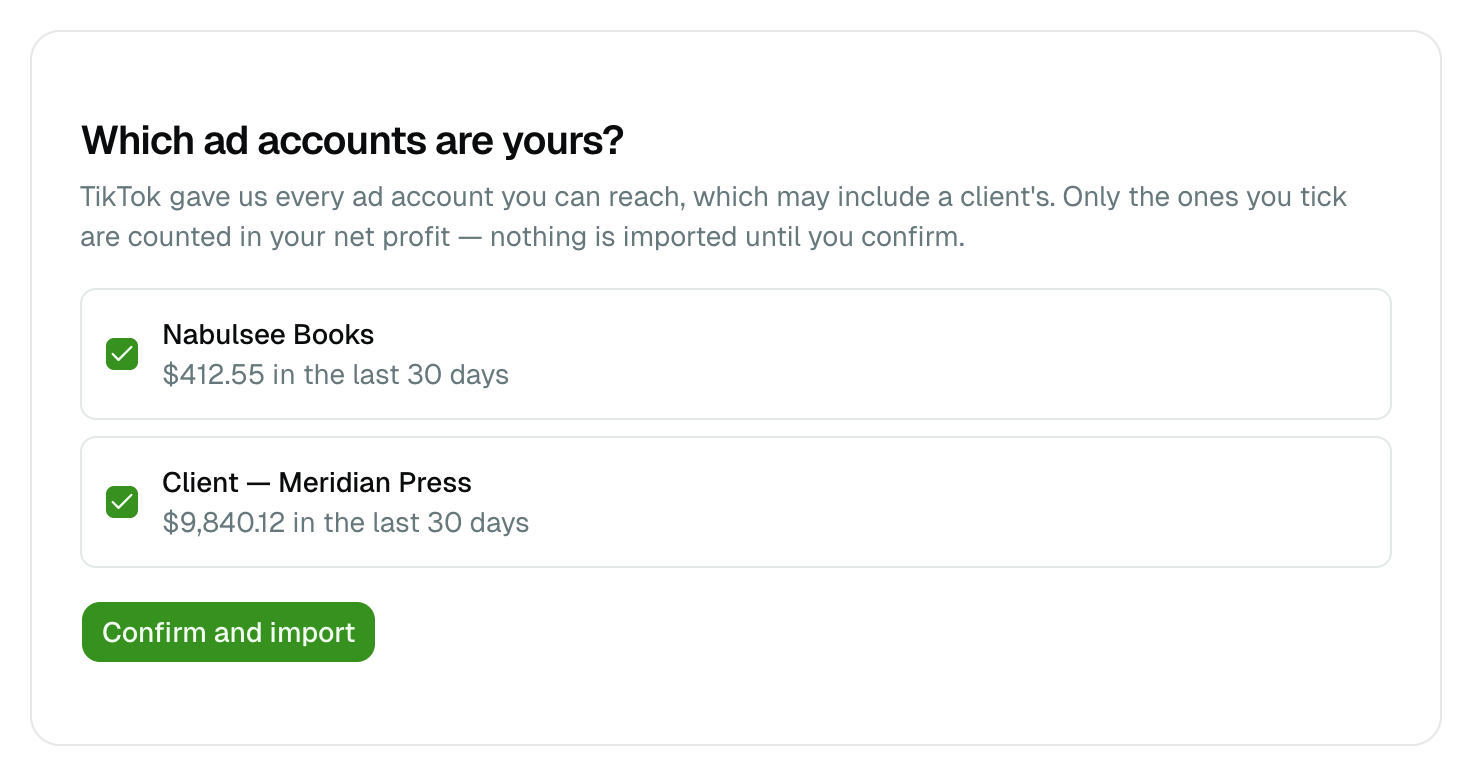
TikTok hands us every advertiser account you can reach. Nothing is imported until you say which ones pay for your books.
That question is not a formality. If you also run ads for a client, or you sit in somebody's Business Center, their account appears in the same list — and importing it would subtract their budget from your royalties. Each line shows what that account spent over the last 30 days, which is usually enough to tell them apart at a glance.
You can include or exclude an account later, from the TikTok Ads page.
The history import
Once you confirm, the recent month arrives first, then TrueRoyalties walks backwards through your history a month at a time. It runs on its own and you can keep using the app while it does; the page shows how far it has got.
Unlike Meta, TikTok keeps your reporting data indefinitely, so there is no cut-off beyond which figures stop existing. The page states the date your TikTok figures begin.
Assign a book and a country
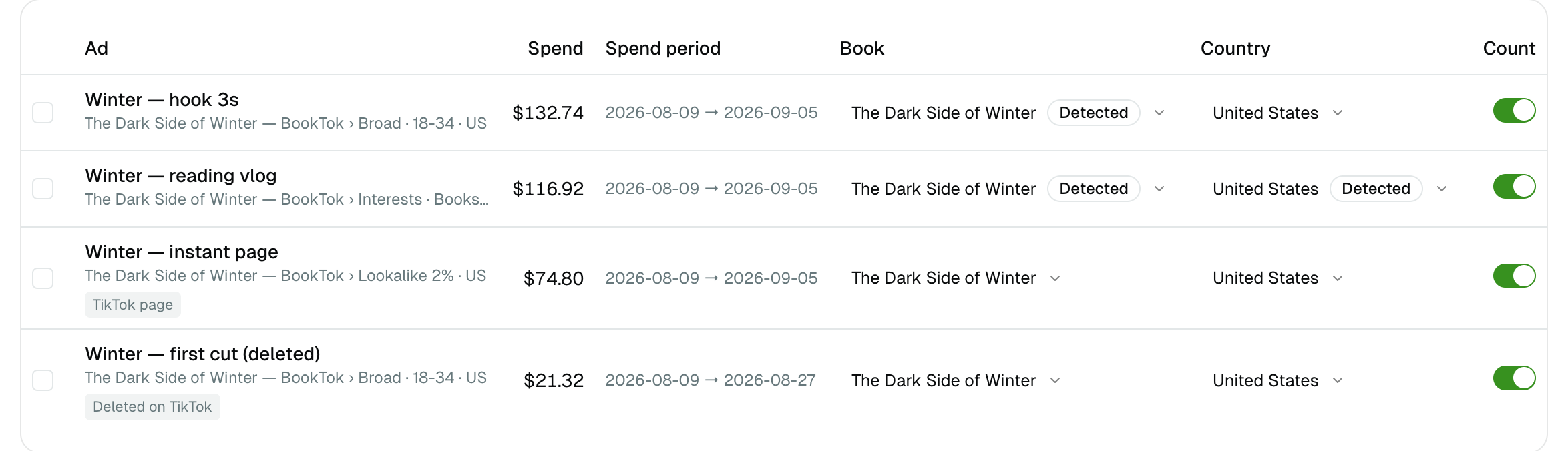
Some ads answer the two questions by themselves:
| The ad links to | What that tells us |
|---|---|
| One of your Smart Links | The book, with certainty — we created that link |
An Amazon product page (/dp/…) | The book and the store |
| A TikTok Instant Page | Nothing — the page is hosted by TikTok and has no link to read. The row is marked TikTok page so you know it is not a mistake |
| Anything else | Nothing. You tell us. |
Where an ad's name contains one of your book titles, we offer that book as a one-click suggestion. We never apply it on our own: a guess that writes itself into a money calculation is not worth the convenience.
The table is sorted by spend, highest first, so the first few rows fix most of the error. Tick several rows to assign them in one go.
Anything you set yourself is never overwritten by a later sync. A value a link revealed carries a Detected badge, so you can always tell the two apart.
Ads you deleted are still listed
An ad you delete in TikTok still spent money on the days it ran. We ask TikTok for deleted ads on purpose and keep them, marked Deleted on TikTok — because dropping them would quietly erase past spend and make an old month look more profitable than it was.
You can exclude one from your calculations if you really want to, using the toggle on its row.
What happens to spend you have not assigned
Spend on an ad with no book still counts in your overall net profit — it is real money — but it cannot appear on a per-book line. The page tells you how much is in that state, and you can choose to leave it out instead.
Spend on an ad with no country cannot be counted at all: without a store there is no currency and no market to charge it to. Assign a country and it appears.
VAT on your TikTok invoices
If TikTok charges you VAT, set the rate in Settings → Taxes. It is a single rate, unlike Amazon's per-store table, because TikTok invoices once according to your own country rather than per storefront. If you have given TikTok a valid VAT number they normally charge you none — leave it at 0 and spend is counted exactly as invoiced.
If your access stops working
A TikTok access token does not expire, so there is nothing to renew. But you can withdraw our access at any time from your TikTok settings, and TikTok does not tell us when you do — we find out at the next sync, which then fails.
When that happens the page says so, tells you the date your figures stop, and we email you once. Spend simply stops arriving until you reconnect; your books and countries are kept.
Disconnecting
Disconnect from the TikTok Ads page. The stored access is deleted at once and nothing more is read.
Your ads and every book and country you assigned are kept, because a disconnection is usually followed by a reconnection and that work cannot be recreated by anyone else. Deleting your account removes all of it.
What is imported
- Spend per ad, per day, in the ad account's own currency
- Impressions and clicks
- Campaign, ad group and ad names, and the link each ad points to
- Whether TikTok has marked the ad as deleted
We receive nothing about the people who saw or clicked your ads — no audiences, no demographics, no list of anyone.