
KENP
Kindle Unlimited pages read — how many, which books, from which marketplaces, how many your ads paid for, and the rate a page actually earned you.
KENP is Kindle Edition Normalized Pages — the pages Kindle Unlimited readers actually read. KU pays on pages, not copies, so for a KU-heavy author this page is where most of the income is born.
What KENP is
KU pays on pages read, not on borrows — a book read cover to cover earns far more than one abandoned on page 3.
Two things follow:
- KENP is eBook-only. Paperback and hardcover have no KENP at all.
- "Normalized" is literal. Amazon normalizes page counts across devices, so a page means the same thing on a phone as on a Paperwhite. That is also why a book's KENPC (its normalized length) is not its printed page count.
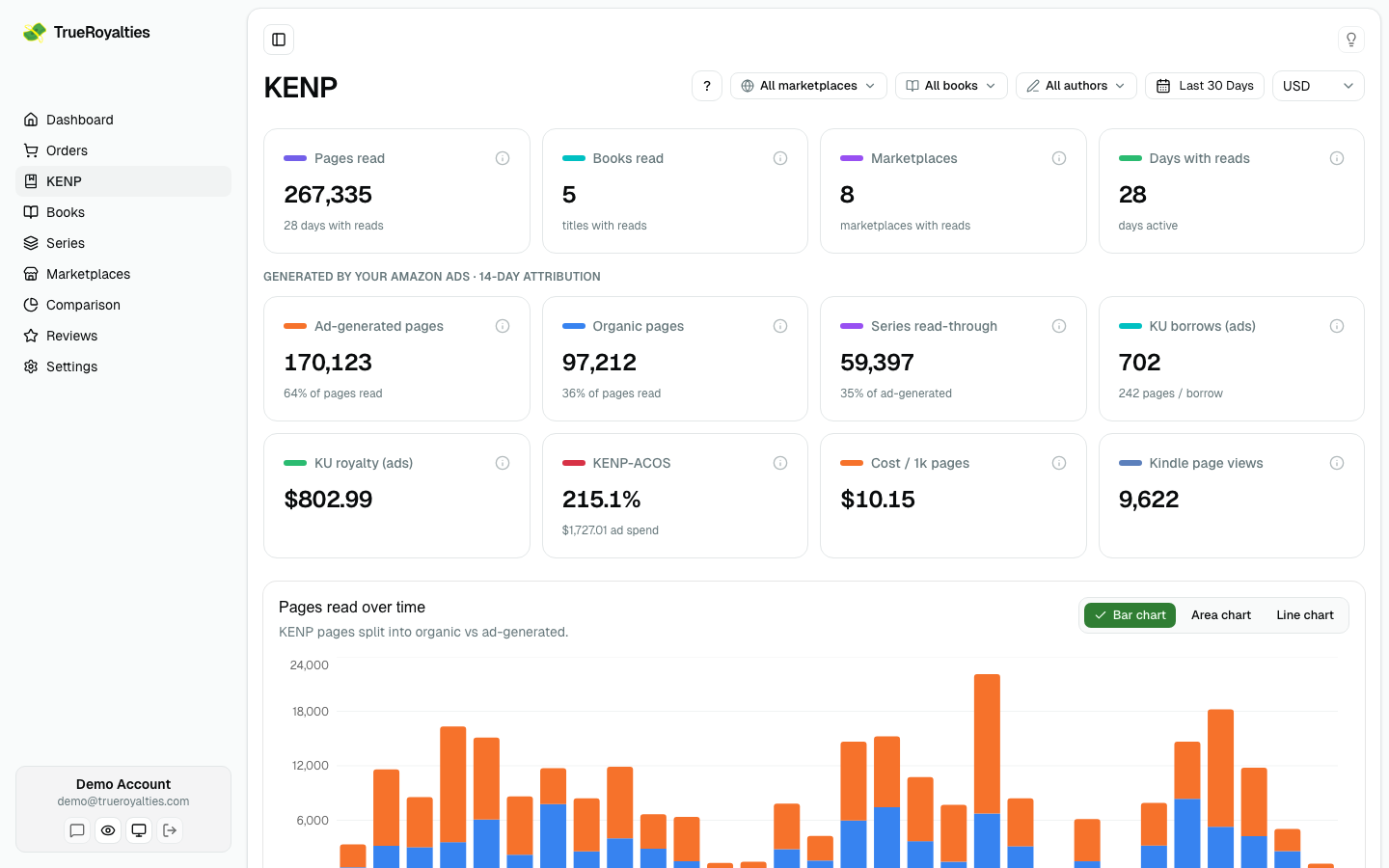
The cards
| Card | Meaning |
|---|---|
| Pages read | Total KENP in the range |
| KU royalty | What those pages earned, before withholding tax — and what share of ALL your royalties that is |
| Per page read | The rate you actually got: KU royalty ÷ pages read |
| Books read | Titles with at least one page read |
These Kindle Unlimited amounts — here, per store, and per title — are figures
KDP reported, converted to your display currency. None of them is
pages × a rate: that estimate would look identical on screen and be nobody's
actual royalty. (The ad-attributed section further down is different, and says
so: those are Amazon's estimates.)
The two money cards step aside while a book or author filter is active, and say so. Kindle Unlimited is paid per store, not per title, so a filtered figure there would divide one book's pages by every book's royalties. The per-title column further down keeps working — that one really is per book.
How much of you is Kindle Unlimited
The share under the KU royalty card is the one number worth watching over time. KDP Select asks for exclusivity — your ebook cannot be sold anywhere else — and this is what you are getting for it. An author at 15% is paying that price for a small part of their income; one at 70% has built their business on a rate Amazon sets alone, and changes monthly.
It compares the same period and the same storefronts on both sides, so switching a filter moves both halves together.
Your rate per page
Amazon never publishes a rate. It announces the size of the KDP Select fund once a month and nothing else, so every KENP rate you have ever seen quoted is worked out by dividing royalties by pages — including the ones on our free Kindle Unlimited page rates page.
This card does that division on your account. Three things to know:
- Over a range covering several months or stores, it is a blend of their rates, not one of them. The per-store figure in the marketplace table is the one to compare against a published rate.
- It follows the currency you pick at the top of the page. Each store pays in its own currency, so compare like with like.
- A rate per title would tell you nothing: Kindle Unlimited pays every book in a store the same rate, so it would only restate where and when that book was read.
Click a card to chart it
The chart below the cards plots whichever cards are highlighted — and a highlighted card is always a line on the chart, in that card's own colour. It opens on Organic and Ad-generated, the split of your reading that matters most. Click Pages read, Series read-through, KU borrows or Kindle page views to chart those instead. Your choice is remembered, so the page reopens where you left it.
Read in order, those six are the whole Kindle Unlimited funnel: page views → borrows → pages read, split into organic and ad-driven, plus the pages one ad pulled onto your other books.
Several at once
Click a second card and both are charted together — that is usually the point. Ad-generated against Series read-through tells you how far one ad reaches into a series; Pages read against Ad-generated tells you how much of your reading your advertising is buying.
Two rules keep those comparisons honest, and they are why some clicks behave differently than you might expect:
- Only measures of the same size share the chart. Pages and borrows differ by around 400× on a real account, so on one axis the borrows would be a flat line along the bottom — true, and useless. Clicking a borrow or page-view card therefore starts a new selection rather than joining the pages one. The two ad-funnel counts still pair up with each other.
- Only Organic and Ad-generated stack — and they stay on one bar even when you add a third metric, because together they are exactly your total. Anything else you select gets its own bar beside them: ad-generated pages are already inside pages read, so piling those up would show a total you never earned.
The last highlighted card cannot be switched off; there is always something on the chart.
The money cards are deliberately not clickable, and it is worth knowing why:
- Amounts and rates (KU royalty, per page read, KENP-ACOS…) are totals for the period you selected, not a value per day. We could draw a line by multiplying pages by a rate, and it would look perfectly convincing — but it would be a number nobody was ever paid.
- Counts of distinct things (books read, marketplaces, days with reads) do not add up over time at all. Five titles this month is not the sum of the daily counts, so a chart of it would be a different metric wearing the same name.
Where the numbers come from
Straight from KDP's own KENP Read report, synced by the browser extension using your KDP session — the same pipeline that imports your royalties. Pages are recorded per day, per marketplace and per title, which is what lets every filter and breakdown on this page work.
Pages read by title
Every title with reads, biggest first, with each one's share of the total and what it earned in Kindle Unlimited. With Amazon Ads connected it splits organic and ad-generated per title, so you can see which book your campaigns are actually feeding. Seven titles a page; sort on any column.
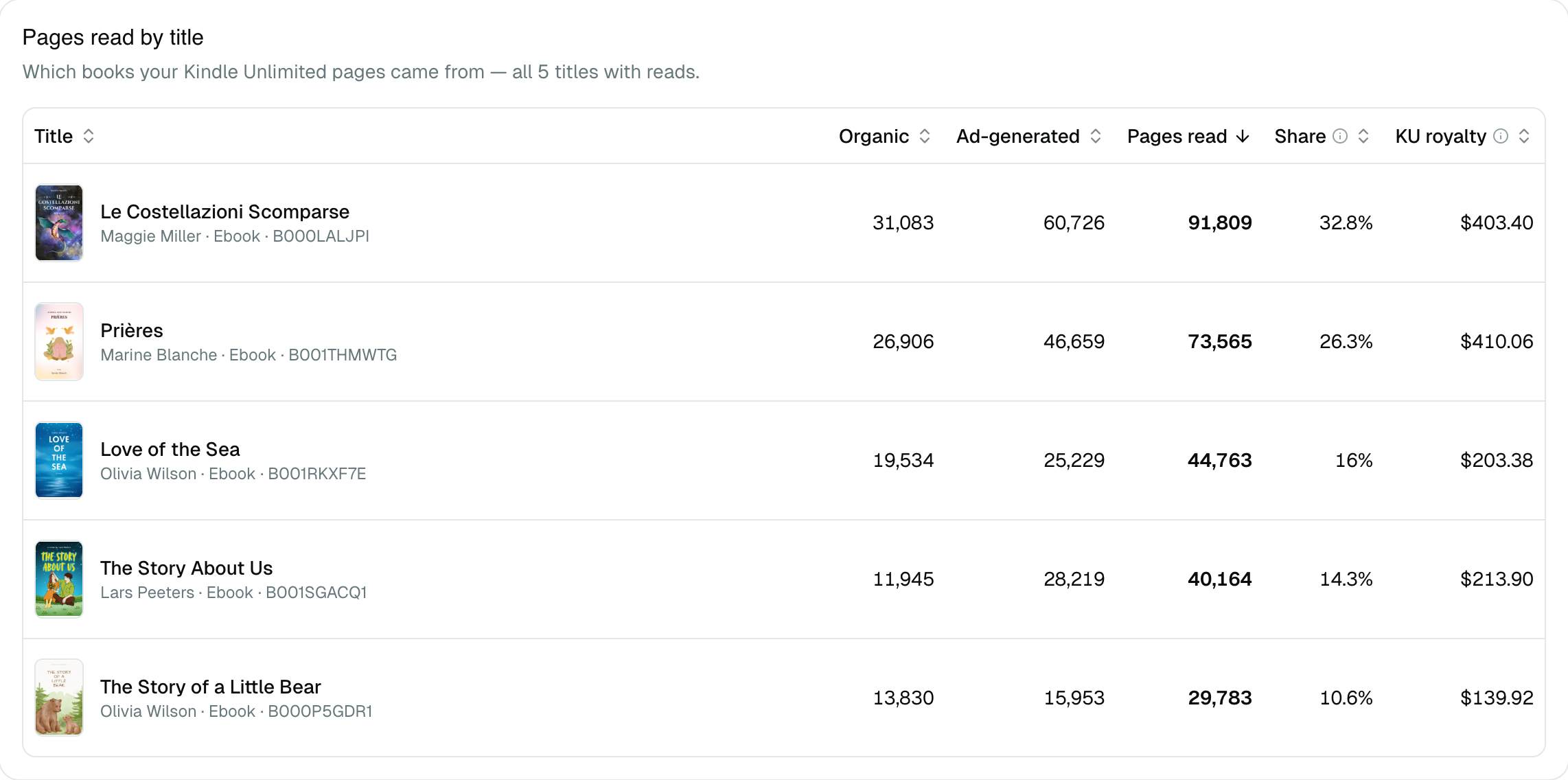
The royalty column adds up to the KU royalty card above it, and so does the one in the marketplace table — the same money, counted per title and per store.
A title appears here only if it was read in the period. For the rest of your catalogue, and for print, go to Books.
Ad-generated pages
With Amazon Ads connected, the page splits your total in two, using Amazon's 14-day attribution window on Sponsored Products ebook campaigns:
Organic = Total pages − Ad-generatedAd-generated is what Amazon attributed to your campaigns; organic is everything else, capped so it can never go negative. It is the same idea as the organic/paid split on Orders, applied to pages instead of units.
That split is the only honest way to judge ads on a KU title: a campaign can look terrible on sales and be excellent once pages read are counted.
Two caveats worth holding on to: the ad figures are Amazon's estimates, and they are a subset of your total pages read — never a separate pile to add on top.
KU ad economics
When ads are connected you also get the money view for the ad-driven slice:
| Figure | What it is |
|---|---|
| KU borrows (ads) | Borrows your ads generated that read enough to earn a royalty |
| KU royalty (ads) | What the ad-driven pages earned — Amazon's estimate |
| KENP-ACOS | Ad spend ÷ ad-generated KU royalty |
| Cost per 1,000 pages | What it costs you to buy a thousand pages read |
Displayed in the currency you pick at the top of the page.
Note the "(ads)": this is the slice Amazon attributed to your campaigns and an estimate, unlike the KU royalty card at the top, which is the whole amount KDP reported. Comparing the two tells you how much of your Kindle Unlimited income your advertising is responsible for.
Series read-through sits alongside them: of the ad-generated pages, those read on other books — the rest of a series pulled along by one ad. Amazon measures this itself and we read it with the rest of your ad data, so there is nothing to enable.
It stays at zero when your campaigns generate no Kindle Unlimited reading at all (print-only advertising, or books not enrolled in KU) — in that case every KU figure on this page is zero too, which is the honest answer rather than a failure. The series-level view of the same idea lives on Series.
Pages by marketplace
Where your reads came from, what each store paid you, and what it paid for a page in the range.
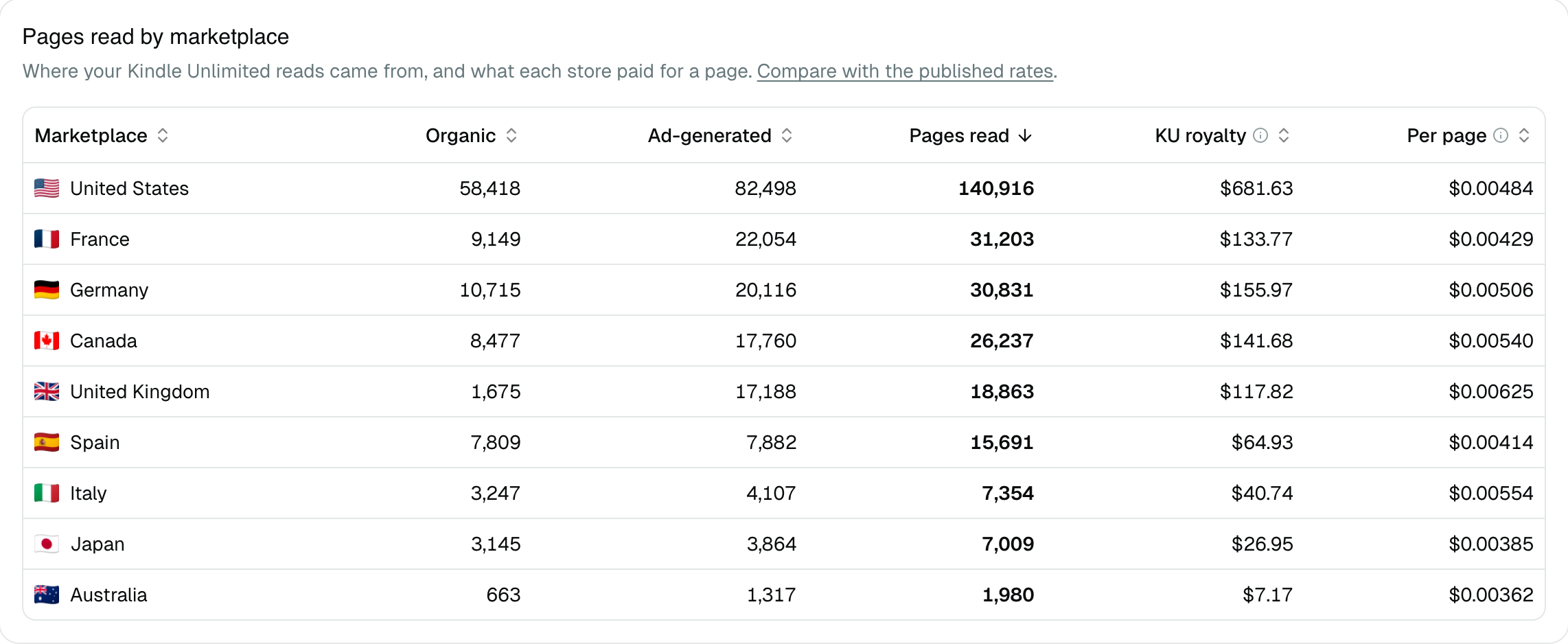
That per-store rate is the figure worth checking: Amazon sets one rate per store per month, so a single store over a single month should land on the number our published rates page shows for it. A gap usually means the range spans several months, or that Amazon has not settled the most recent one yet.
Where the money is
The KU royalty shown here is not a separate income stream — it is the Kindle Unlimited share of the royalties you already see on the dashboard, Books and Marketplaces. Filtering those pages to the "Kindle Unlimited" distribution channel gives you the same figure.
Timing
Two different delays, often confused:
- The pages can still move for a recent period: KDP finalizes them as Amazon confirms the reads.
- The rate — how much a page is worth — is only fixed by Amazon around the middle of the following month. So recent KU income, and the "per page read" figure that comes out of it, are estimates until then.
On long date ranges the chart switches to a monthly view, like the other reports.
Showing or hiding the page
Settings → Preferences → KENP section controls whether it appears in the sidebar: always, never, or automatically when you have KU data. The page stays reachable by link either way.