
Orders
Units sold, split between what your ads brought in and what sold on its own — by format, marketplace and title, and how the two sources are lined up.
Orders is about volume, not money. It answers: how many copies moved, and who brought the reader — your ads or your catalog? Everything on this page is a plain unit count: no currency conversion, no tax.
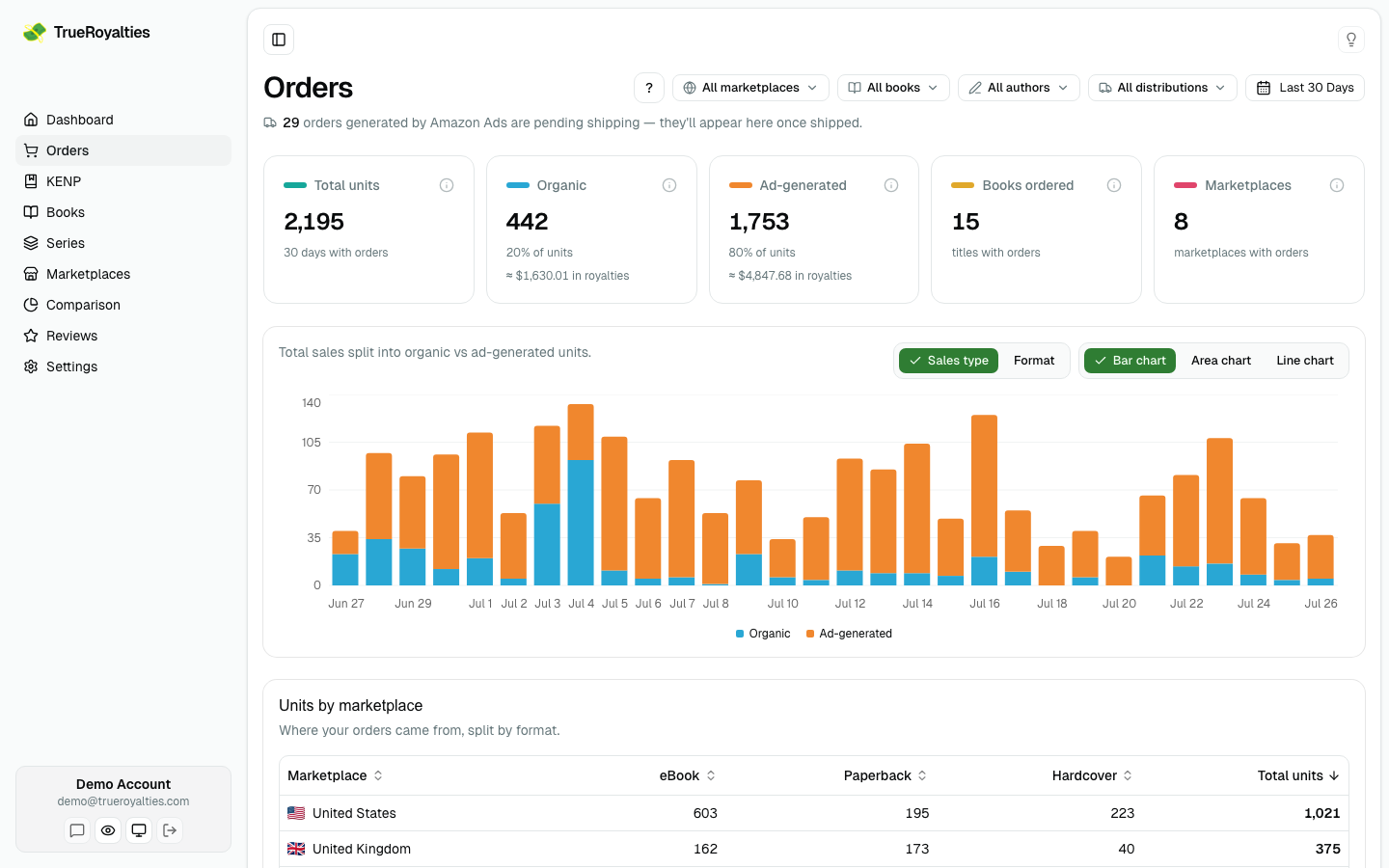
The cards
| Card | Meaning |
|---|---|
| Total units | Every copy ordered in the range |
| Organic | Units that came without an attributed ad click, with their share and royalties |
| Ad-generated | Units Amazon attributes to your ads, same detail |
| Books ordered | How many distinct titles sold |
| Marketplaces | How many stores you sold in |
Read the split rather than the totals: a rising ad-generated share with flat total units means you are paying for sales you used to get for free.
Where the numbers come from
Two sources, and they do not count the same event at the same moment.
- KDP gives your total sales, organic and ad-driven together. For paperback and hardcover KDP only records a sale once the book ships — usually about 2 days after the order. eBooks and audiobooks are instant — a download has nothing to ship.
- Amazon Ads gives the sales your ads generated, counted at order time.
From those, three numbers:
| Number | What it is |
|---|---|
| Total | Every unit KDP reports as sold |
| Ad-generated | Units Amazon Ads attributed to your campaigns |
| Organic | Everything else — Organic = Total − Ad-generated |
Ad-generated only counts ads tied to a book in your catalogue. Ads for other products do generate sales, but those never appear in your KDP report, so counting them would break the subtraction.
Why organic is never negative
Amazon Ads counts a print sale at order time; KDP counts it at shipment time, about 2 days later. So on any given day the ad number can land before KDP's total, and subtracting them as they come would push organic below zero. They are lined up first:
- Ad-generated print units are shifted forward ~2 days, onto KDP's shipment date. eBooks need no shift.
- Each day, ad-generated is capped at that day's KDP total — it can never exceed what KDP actually reported.
- Any surplus that doesn't fit rolls to the next day, then the next: if the sale still isn't on KDP by day 2, we look at day 3, day 4, day 5…
Ads report a paperback sale on Monday → it is matched against KDP's Wednesday total, once it has shipped. If Wednesday's total is smaller than the ads claim, the leftover waits for Thursday, Friday… until KDP's totals can account for it.
The guarantee: ad-generated is always ≤ total, so Organic = Total − Ad-generated
is always zero or positive — every day, every format.
A note at the top of the page tells you when some ad-generated orders are still pending shipping. Nothing is lost; those units land a day or two later.
Why ad-generated won't exactly match the Amazon Ads console
Both numbers are right — they don't measure the same thing. Four differences, all expected:
- Copies vs orders. We count units (Amazon's Units sold) so the figure can be subtracted from your KDP units. The console's headline Purchases column counts orders — a reader buying 2 copies is 2 units but 1 purchase, so Purchases always reads a little lower.
- Console filters. The console's campaign list ships with a state filter (All but archived) and a date range. We count every campaign, archived included — the money was spent either way.
- Marketplaces and currency. We add up every marketplace and convert at each day's real exchange rate; the console uses its own. Expect a fraction of a percent of drift on the spend.
- Ads with no book. Sponsored Brands and Store ads aren't tied to a single title, so their sales can't be matched to a KDP book and stay out of ad-generated. Their spend still counts in your net profit.
The chart
Stacked by sales type (organic vs ad-generated) or by format (ebook, paperback, hardcover, audiobook). Bar, area or line.
The format view and the tables use the raw KDP totals. On long date ranges the chart switches to a monthly view, where the 2-day shift no longer matters — and the KPI cards apply the same cap across the whole window rather than day by day, since the shift cancels out over a period.
Units by marketplace
A table of where the orders came from, broken down by format. Sortable by any column.
Paid, free or both
The units menu at the top of the page holds two checkboxes — Paid units and Free units — and they switch every figure on the page:
| Ticked | What you see |
|---|---|
| Paid units | Copies sold — the default |
| Free units | Copies given away at a price of zero: free promotions, permafree titles, zero-price downloads |
| Both | Both side by side: free downloads stack on top of the paid split in the chart, and the table gets a Free units column |
Free units are never revenue: whatever you pick, they stay out of your royalties, net profit and subscription tier. They exist for ebooks and audiobooks only.
KDP reports free units per day, book and marketplace. Kobo and Draft2Digital don't say the country, so their free downloads appear as Country not reported instead of being guessed, and a note on the page says how many.
Filters
Marketplace, book, author, distribution, paid or free units, and date range. The author filter is useful if you publish under several pen names.
Before you act on the split, read what it means and its two honest limitations in Organic vs ad-generated. The same idea applied to Kindle Unlimited pages lives on KENP.